
Tokens
Access tokens let external tools and software platforms authenticate against your Indicate space. There are two types: Agent Tokens for AI assistants and automation tools, and API Tokens for using Indicate as your data infrastructure layer.
What's the difference between Agent Tokens and API Tokens?
Indicate offers two kinds of access tokens. They look similar (both are credentials paired with an account) but serve very different purposes.
Agent Tokens are for external tools that act on a person's or team's behalf, such as AI assistants like Claude, automation tools like n8n, and code editors like VS Code via MCP. The classic use case: you want to chat with your commpanies data with an AI like Claude.
API Tokens are for using Indicate as a data infrastructure layer. They authenticate another software platform that reads from Indicate via the API, such as an internal product, or a customer-facing application. Indicate stores and governs your data, and your downstream systems read from it through API Tokens. They are an Enterprise feature.
If an integration is a tool acting on someone's behalf, you want an Agent Token. If it's a software platform reading Indicate as a data source, you want an API Token.
How do tokens relate to my accounts?
Both token types are paired with one account, either a Member User (a real person) or a Service User (a non-personal account for shared team or system access). The token inherits all access rights from that account.
One account can have multiple tokens.
One token belongs to exactly one account.
Revoking a token does not affect the account.
Deleting an account revokes all of its tokens.
Both token types can be paired with either account type. Member Users and Service Users are available on all plans. See → Team for the user model.
What are Agent Tokens?
Agent Tokens authenticate external tools like Claude, n8n, and VS Code that act on a person's or team's behalf through MCP. They are available on the Core, Pro, and Enterprise plans, billed per seat by scope. There is a token limit, so only a certain number of requests are included.
See → Agent Tokens for scopes, how to create one, and how to revoke it.
What are API Tokens?
API Tokens authenticate another software platform that reads from Indicate via the API, such as BI tools, internal products or customer-facing applications. They are an Enterprise feature. See the pricing page for plan details.
The typical setup: Indicate is your governed data layer, and your downstream platforms query metrics through API Tokens. This keeps definitions consistent across every consumer, instead of each platform re-implementing its own version of the same metric.
See → API Tokens for more.
Where do I manage tokens?
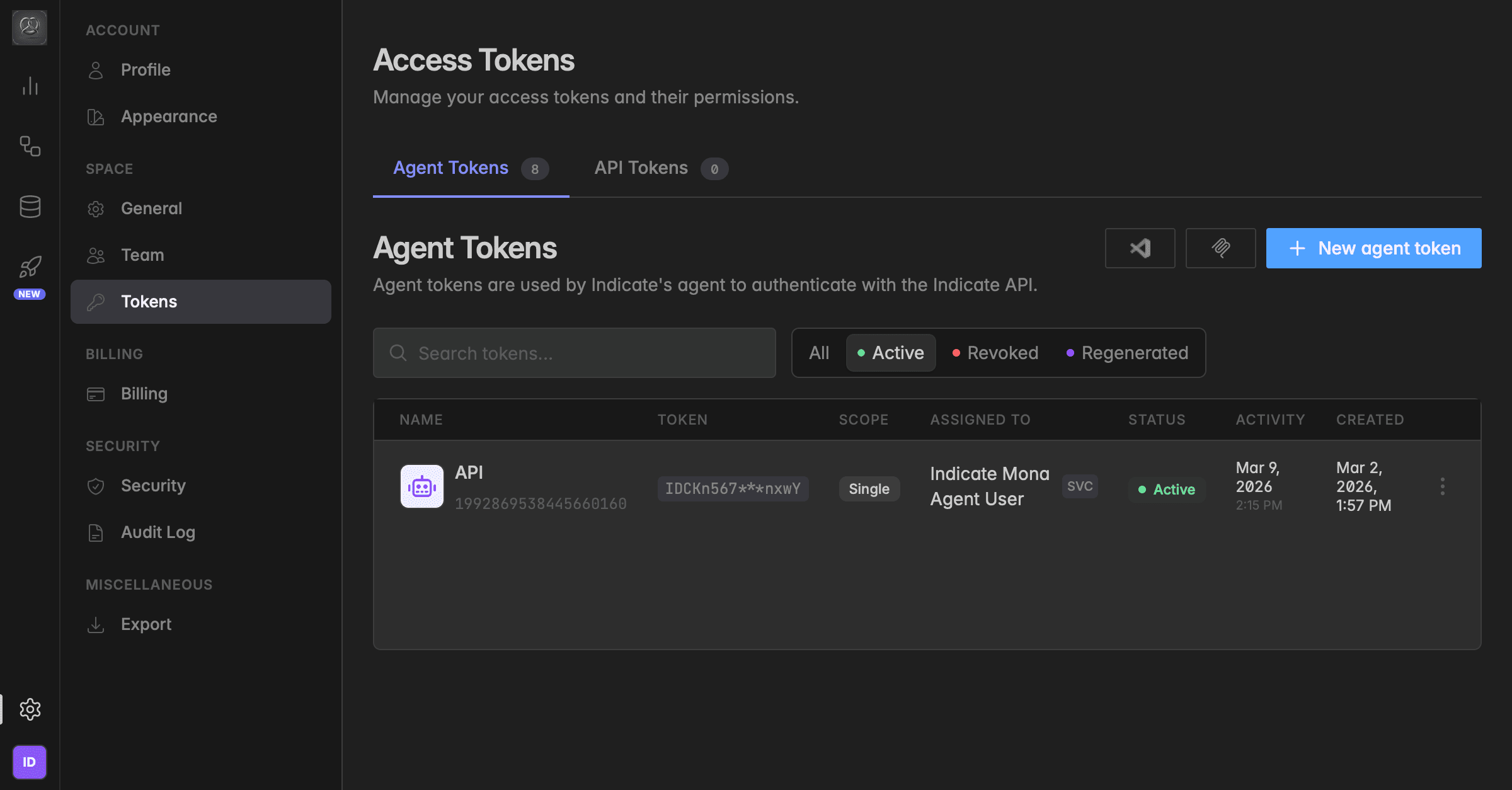
Both token types live under Settings → Tokens. The screen is labelled Access Tokens and has two tabs: Agent Tokens and API Tokens.
From either tab you can:
Create a token: + New agent token on the Agent Tokens tab, or a new API Token on the API Tokens tab.
See each token's Name, masked Token, Scope, Assigned to account, Status, last Activity, and Created date.
Use the
⋮menu on any token to Edit, Regenerate, Install in VS Code (Agent Tokens only), View mcp.json (Agent Tokens only), or Revoke.Filter by All, Active, Revoked, or Regenerated, or search by name.
Only Owners and Admins can create, regenerate, or revoke tokens. All changes are recorded in the Audit Log under the `API Tokens` namespace.
Troubleshooting
I assigned a token to the wrong user or account.
Open the
⋮menu on the token and choose Edit, select the correct account under Assigned user, and click Save changes. You can reassign a token at any time.
What is the difference between single-space and multi-space?
A single-space token works only in the space where you created it. A multi-space token works across every space the assigned account belongs to. See the pricing page for the price of each scope.
How do I delete a token?
Tokens are not deleted, they are revoked. Open the ⋮ menu on the token and choose Revoke. The token stops working immediately, but the account it was assigned to stays intact. See → Agent Tokens.
Was this helpful?